

 عربي
عربي  Français
  Türkçe
  Deutsch
  简体中文
简体中文 
Grant Facebook Page Access for destimotions
This guide shows step by step how to add destimotions as an administrator with full access to a Facebook Page.
Open video in new tab
Prerequisite: A Facebook Business Page must already exist.
1. Open Facebook settings
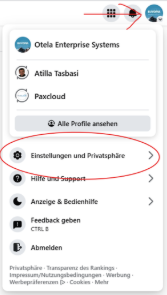
Log into Facebook and select your business profile in the top right. Then open Settings & Privacy.
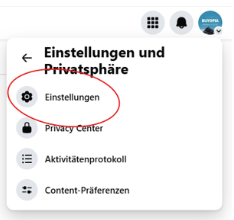
2. Go to settings
Click on Settings in the menu.
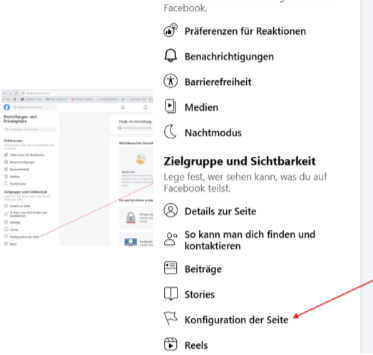
3. Open configuration
In the left menu, open Page setup.
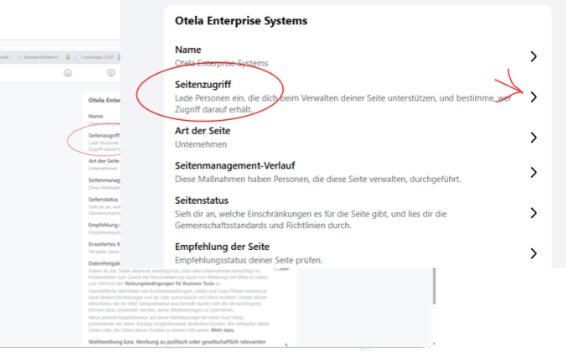
4. Open page access
In the left menu, click on Page access.
5. Add a person
Click on Add new person.
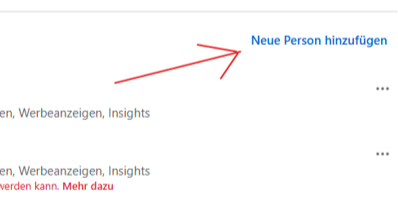
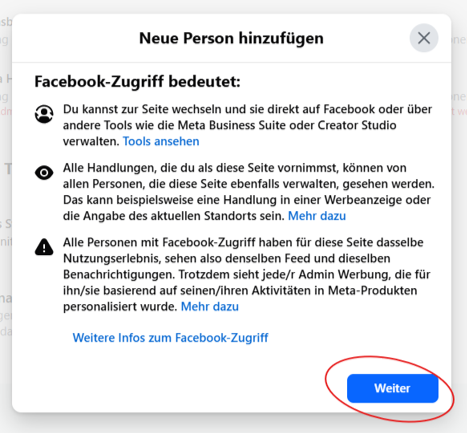
Then add the following person:
Atilla Tasbasi
at@tasbasi.de
IMPORTANT: Grant full access
In the permissions window, make sure to enable Full access. Only with this setting can destimotions fully manage the Facebook page.
In the permissions window, make sure to enable Full access. Only with this setting can destimotions fully manage the Facebook page.
6. Complete confirmation
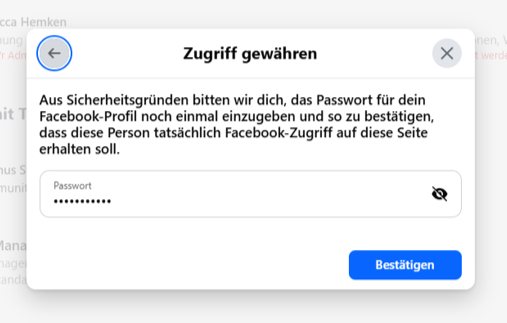
Confirm the invitation and complete Facebook’s security check.
Note:
If the page is managed via Meta Business Manager, access must be granted there instead.
If the page is managed via Meta Business Manager, access must be granted there instead.
More information:
Facebook Help Center (access permissions)

Connect Instagram with Facebook Page
This guide explains how to connect an Instagram account to a Facebook Page. This connection is required for advertising, content management, and insights.
Open video in new tab
Open video in new tab
1. Open Facebook
Log into Facebook and open your business page.
2. Open settings
Click Settings in the page menu.
3. Open linked accounts
Go to Linked accounts or Instagram.
4. Connect account
Click Add account or Connect.
5. Instagram login
Log in with your Instagram credentials, confirm access, and complete the connection.
Important:
- The Instagram account should be a Business or Creator account.
- The Facebook page must have admin rights.
- If Meta Business Manager is used, the connection is done there.